A boat inspection happens standing up, one hand on a rail or hatch and the other holding the phone. That is the job. So every checklist screen is built around one thumb doing one thing at a time: pick an answer, take a photo if needed, tap Next.
Starting the visit
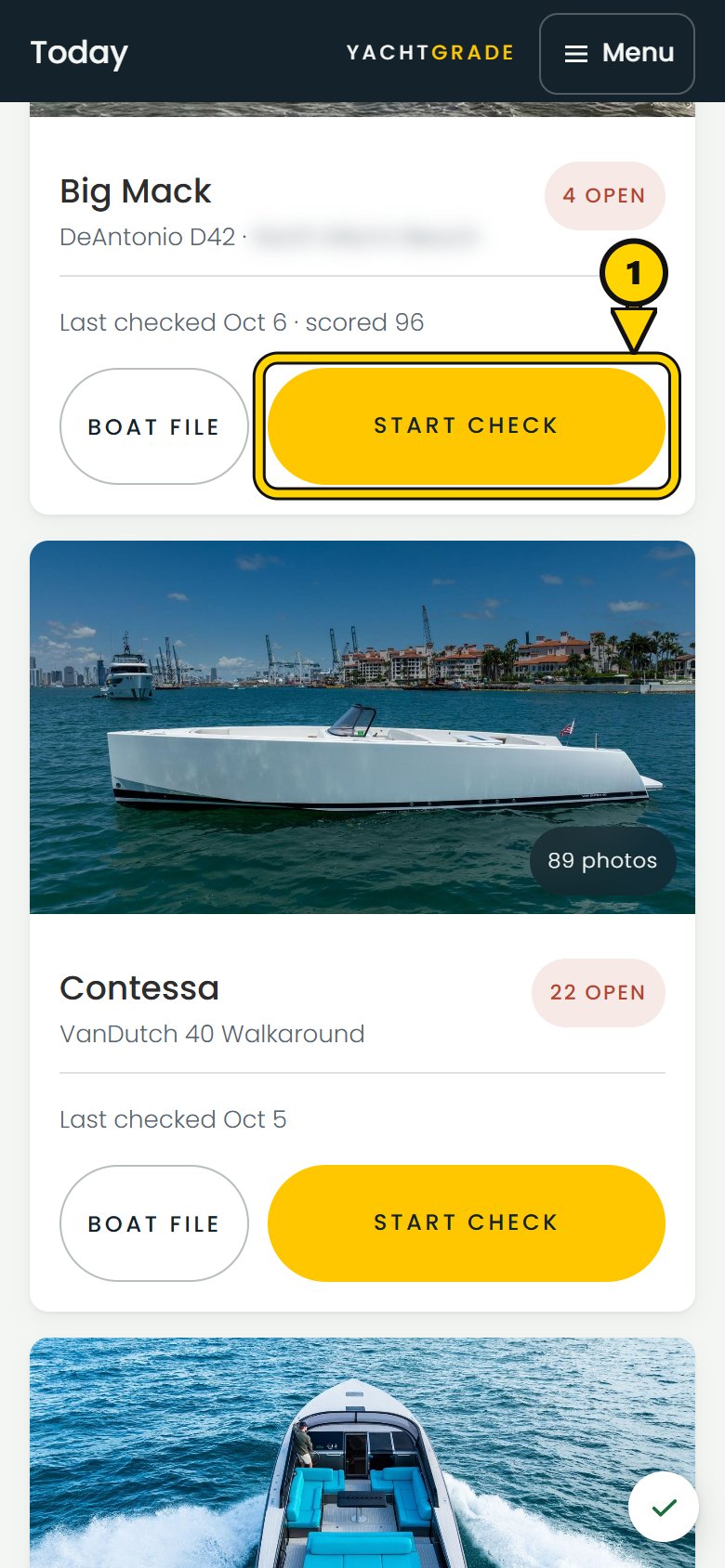
Open the boat's card and start a check. What loads next is not a blank form. It is the boat's checklist, assembled from universal checkpoints plus the checkpoints its equipment profile adds. A generator strainer appears only if the boat has a generator. A bow thruster compartment appears only if it has a thruster. There is no N/A answer because a technician should not have to mark equipment the boat does not have on every visit. Remove the thruster from the boat's profile and its checkpoints stop appearing. They are removed from the checklist, not skipped on every visit.
The checkpoint screen
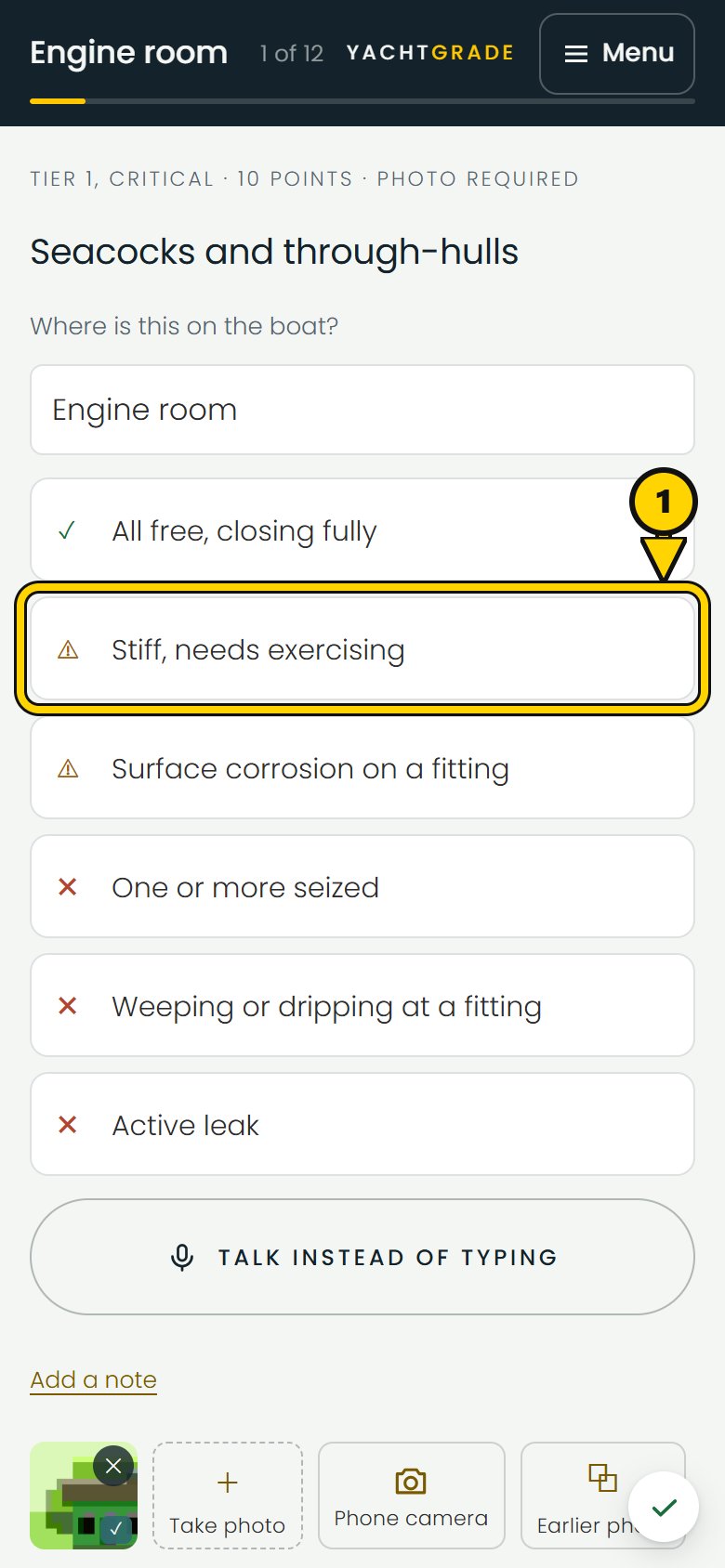
Every question gets its own screen. It shows the question, any instructions written for that boat, a reference photo if there is one, the answer options, Talk instead of typing, a note and the photo strip. Talk instead of typing records what you say and offers it back as an answer or a note, for you to accept or turn down. The instructions can tell a tech who has never been aboard exactly where to find the item. A line under the question shows its tier and points, so the tech can see why a seized seacock carries more weight than a scuffed rail.
The technician does not enter a score or move a slider. The answers are Pass, Watch or Action, with choices written for what is actually in front of the tech, such as "stiff, needs exercising" or "one or more seized." The tech picks what is true. If more than one answer applies, the more serious one governs. A bilge that is both damp and has oil in it is Action, not an average of the two.
Use one photo for more than one question
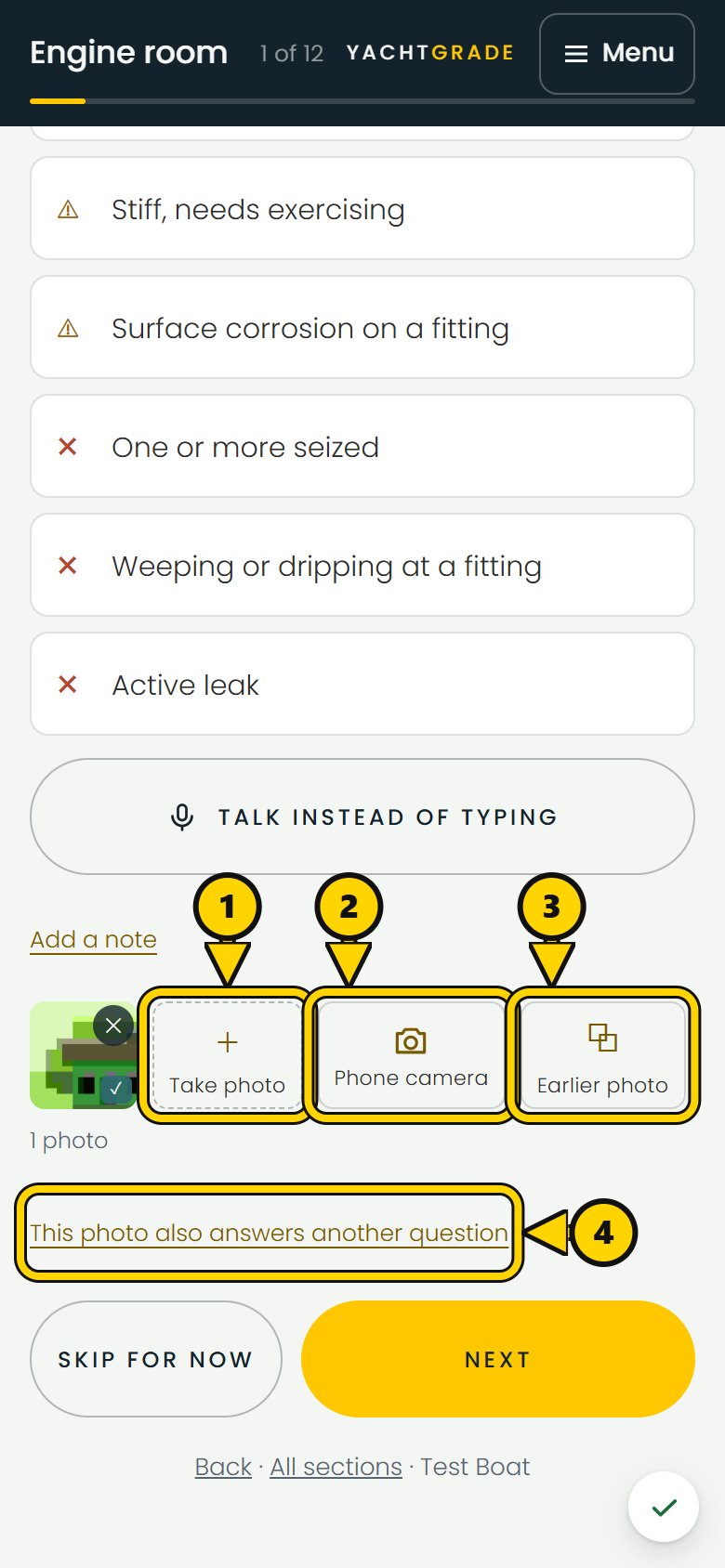
Tap Take photo and take the photo. It saves on the phone and attaches to that checkpoint straight away. It does not have to upload first, which matters when the signal drops. We cover that in the next article.
Phone camera opens the phone's own camera instead, with its own lenses and zoom. Its photos are stamped and saved the same way.
Earlier photo opens the boat's photo library. You may already have a shot of the bilge because you were photographing the pump beside it. Use that photo instead of taking a near-duplicate. It keeps the date it was actually taken, stamped on the image, rather than today's date. That way, the report shows when the photo was really taken.
One photo can also cover two questions, which is common in an engine room. Once a photo is attached, you can use it for another question in the same section, such as the bilge and its pump. Both questions still get their own answer without a second photo of the same area.
Skip for now, and Next
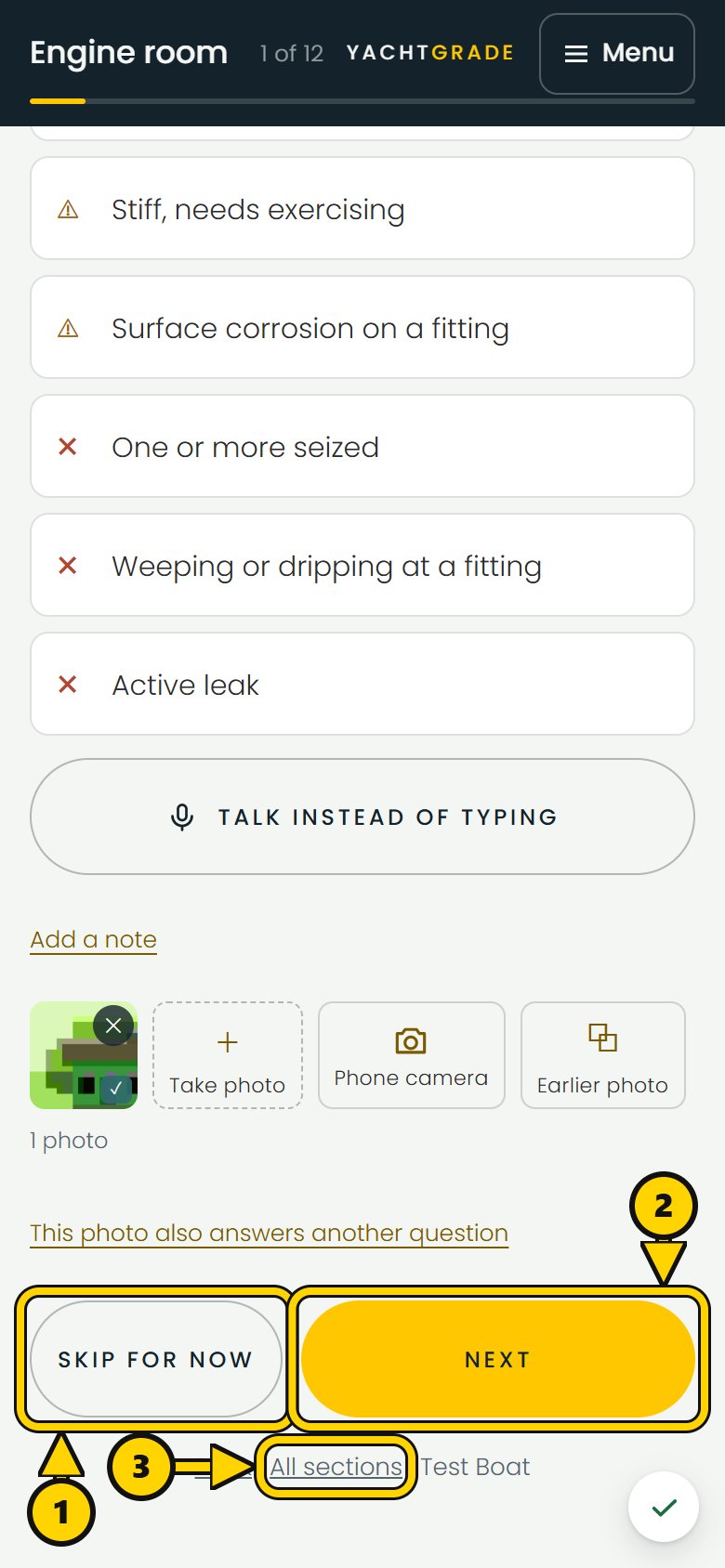
Two buttons sit at the bottom of every checkpoint screen, within easy reach of one thumb and clear of the phone's home indicator. Skip for now moves on without an answer. Use it when the engine is running and a seacock is not accessible yet, or when the question needs someone else on hand. Next only lights up once an answer is selected and any required photo is attached. You do not have to remember which checkpoints require a photo. Next stays unavailable until the required photo is there.
Coming back to what you skipped
Finish the last item in a section and the app moves straight into the next one. You do not have to return to a menu between sections. After the final question, you reach the review list: every question on the boat in one scrolling page, showing what is answered, skipped or still open. It has To do and Done tabs, and a search box that finds a question by its wording, section or place. That is where you can find and finish a skipped seacock question. You can also open All sections at any time during the visit from the row under each checkpoint, next to Back and the boat's name.
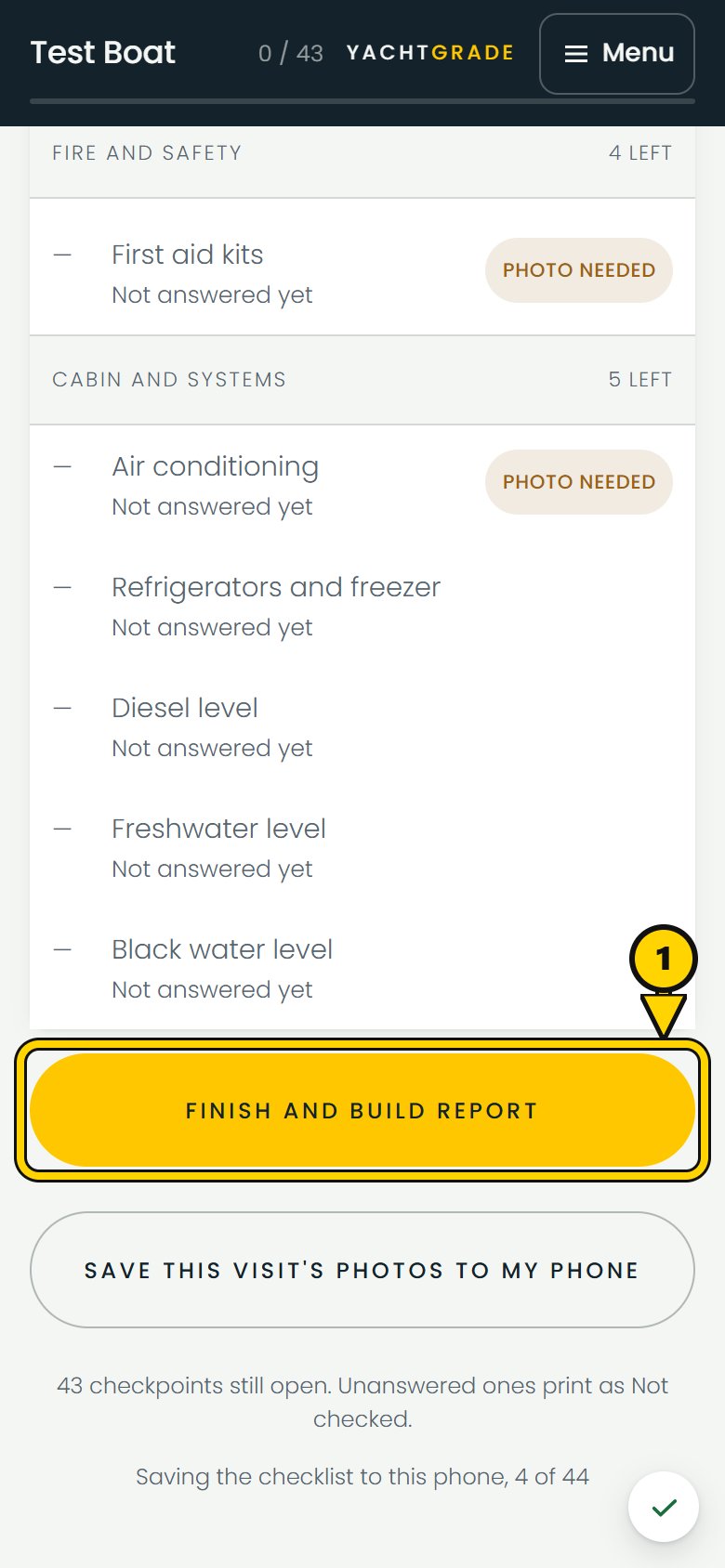
Anything left unanswered does not disappear and does not count as Pass. It appears on the report as Not checked. Coverage shows how much of the checklist was actually answered, so a boat checked on 40 of 44 checkpoints does not read as though all 44 were completed.
Finishing and issuing the report
Finish and build report is the last tap. If a photo or answer is still waiting on the phone to upload, YachtGrade tries again and tells you what is still waiting. Once everything is accounted for, it builds the report: a frozen record of that visit with the answers, photos, score and date. Each report gets its own link. Finishing a later check creates a new report and does not change an earlier one.
The inspection itself can be done with no signal. A tech can record answers and take photos with no bars, and both save on the phone until signal returns. Sharing the finished report needs a connection. The next guide explains how offline photos and answers work before your first job somewhere the marina Wi-Fi does not reach.
Common questions
Can I skip a question I can't answer yet and come back to it
later?
Yes. Skip for now moves you on without recording an answer. Every skipped question appears on the review screen so you can return to it before you build the report. If you leave it unanswered, it is Not checked, not Pass.
Does a boat inspection app replace a marine survey?
No. A YachtGrade check is a recurring maintenance and condition record run
by a tech, captain or owner, not a certified survey carried out by an
accredited surveyor for insurance or financing. It's a different document
doing a different job.
What happens to questions about equipment a boat doesn't have?
They do not appear. The checklist combines universal checkpoints with equipment-driven checkpoints from the boat's equipment profile. A boat with no generator does not get generator questions, so there is no N/A answer to tap.
Can one photo answer more than one checklist question?
Yes. Once a photo is attached to a question, you can use it for another question in the same section that shows the same area. A bilge and its pump are a common example. You do not need a near-duplicate photo just to answer the second question.
More how-to guides
YachtGrade was designed by a USCG 100-ton captain who spent five years managing, detailing, running and selling boats in South Florida, after four years building IT systems for businesses. Who built it →