“Set up a boat inspection checklist for my company” sounds like a job: pick the questions, build a form, and hand it to your techs. In YachtGrade, you do not build each boat's checklist by hand. You add a boat, tell YachtGrade what equipment it carries, and its checklist is built from that information in the order a technician will walk the boat.
Here's how a YachtGrade boat inspection checklist is assembled, and how to customize it when one boat needs something different from the rest of the fleet.
Three layers, not one list
Every boat's checklist is built from three things stacked on top of each other:
- Universal checkpoints. Apply to every hull in the fleet: seacocks and through-hulls, bilge pumps, fire extinguishers, shore power and navigation lights. These come from the boat's size class because a 28-footer and a 100-footer do not get the same set of questions.
- Equipment-driven checkpoints. Appear because the boat's equipment profile says it carries that gear. No generator, no generator-strainer question. Add a Seakeeper to the boat's registry and its checkpoints appear on the next check.
- Boat-specific one-offs. Added by hand, per hull, for something unique to that boat.
On top of those three is another layer that is not part of the checklist itself: per-boat instructions that say exactly where each item is checked on that boat. You do not maintain separate copies of the same checkpoint across the fleet. Reword it once in the shared library and every boat that uses it gets the new wording, instead of forty copies slowly drifting out of sync because someone edited one and not the others.
Why there is no N/A
YachtGrade has no N/A answer on a checkpoint. That is deliberate, because applicability is decided before the technician starts the inspection. An N/A option can blur two different situations: the boat does not have a generator, or the technician did not check the generator. YachtGrade keeps those situations separate.
Instead, applicability is handled by the equipment profile. If the boat's profile does not list a generator, generator checkpoints do not appear on its checklist. If it does carry one, those checkpoints are answered Pass, Watch or Action. The equipment profile decides which equipment-driven checkpoints appear. The technician records what is true.
The inspection is walked by place, not by section
Checkpoints are organized into sections on the page, such as hull and through-hulls, bilges and pumps, engine room, fire and safety, and electrical. But the technician walks the boat by where each checkpoint is physically located. That keeps the tech from crossing the engine room three times because three sections happen to include questions there. Most checkpoints already default to a sensible place. An engine-room item defaults to the engine room, and a checkpoint tied to a specific unit uses that unit's location if you have recorded one.
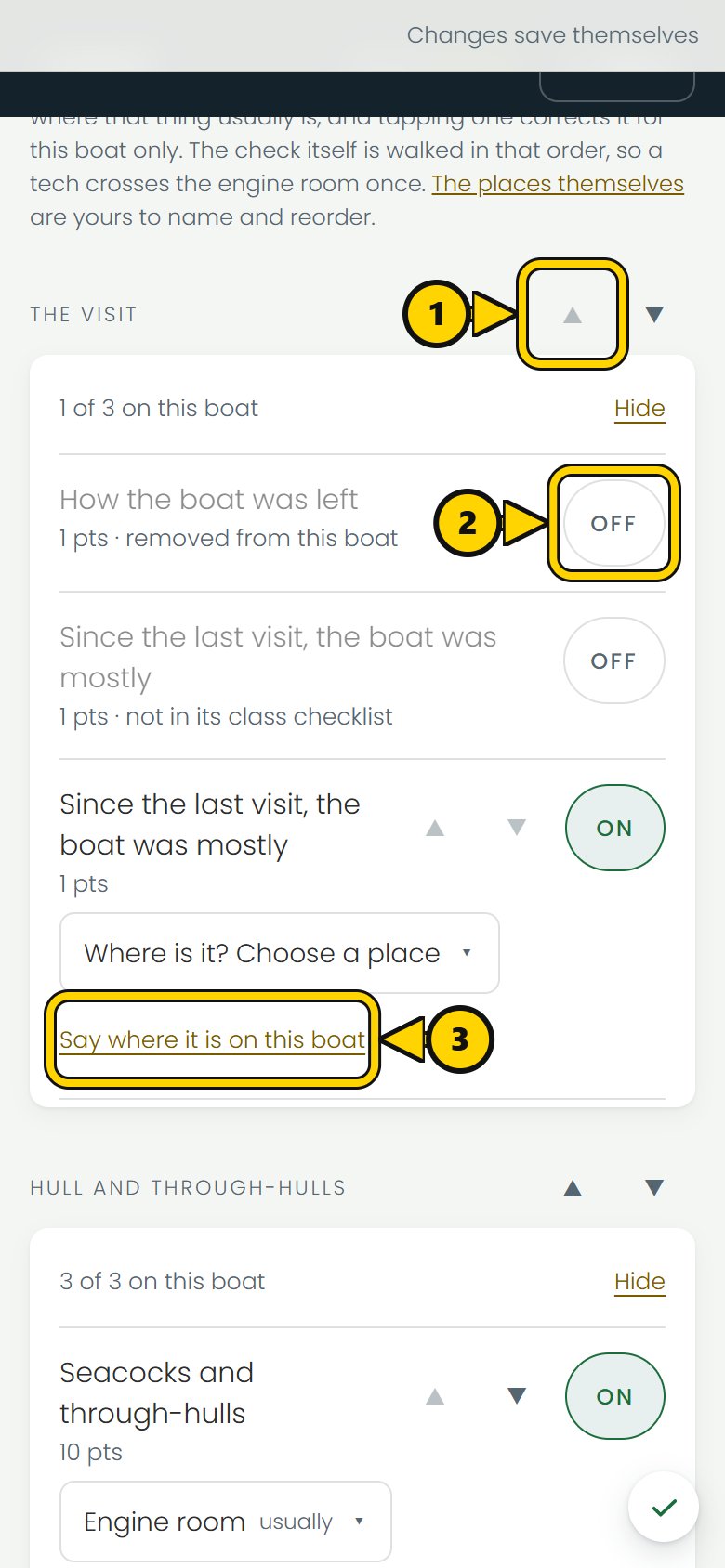
The order a check follows is set when you walk the boat during setup. The places you tap, in the order you tap them, become that boat's route, so the tech crosses the engine room once. The arrows on the boat's checklist screen move a section or a checkpoint earlier or later, and that order is shared by every boat. Turning a checkpoint on or off, and noting where it is found, changes only that boat.
Turn checkpoints on or off for one boat
Every checkpoint on a boat's checklist screen has an On/Off control. Turning one off removes it from that boat only, with an optional reason. Turning on a checkpoint that would not normally apply adds it to that boat only. Clearing an override hands the checkpoint back to the normal rules. If you later add equipment that would trigger it, the checkpoint starts appearing from those rules instead.
This is separate from the equipment profile on purpose. The profile answers, "What equipment does this boat carry?" The On/Off control answers, "Do we want this checkpoint asked on this specific hull anyway?" That covers one-offs a size class and equipment list cannot anticipate.
Customizing a checkpoint for one boat
Two things can be customized per boat without touching the shared library at all:
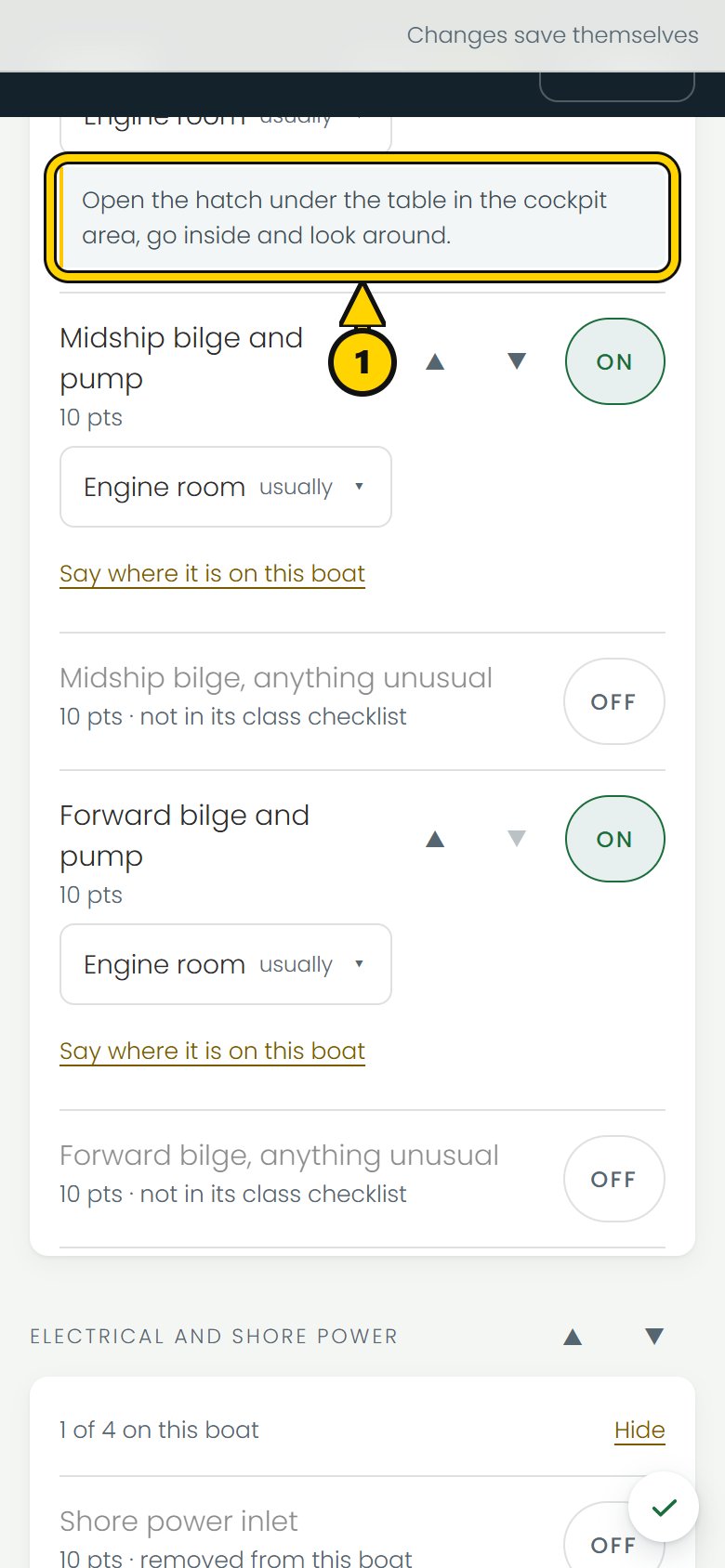
- Where it's checked. Add a short note under the question, such as “hatch under the table in the cockpit.” Write it once and the technician can see it on later visits.
- Which place it's grouped under for the walk, when the default is wrong for that boat. A hundred-footer can have equipment spread across spaces in a way a 40-foot express cruiser would not, so the default is a starting point, not a rule.
Wording, tier and answer options live in the shared checkpoint library and change for the whole fleet at once. That gives every technician the same checkpoint wording, even on a boat they have never been aboard before.
What Pass, Watch and Action mean
Every answered checkpoint is recorded as Pass, Watch or Action. The technician does not enter a numeric score by hand. Each answer already carries the state and points used by the Condition score. Where more than one answer can be true, the more serious one governs. A bilge that is both damp and has oil in it is scored as Action, not averaged down. A checkpoint the technician did not get to is not recorded as Pass. It is marked Not checked and reduces Coverage, so an unanswered checkpoint does not improve the boat's score.
Common questions
How do I set up a boat inspection checklist for my company?
You do not build one from scratch. Add the boat and fill in its equipment profile with what it actually carries. YachtGrade combines universal checkpoints with the equipment-driven checkpoints that profile triggers. From there, you can turn individual checkpoints on or off for that hull, and note where each one is checked on the boat.
Why doesn't a checkpoint show up on one of my boats?
Most commonly, the boat's equipment profile does not list the equipment tied to that checkpoint. No generator means no generator checkpoints. The checkpoint may also have been turned off for that boat. Either reason appears on the boat's checklist screen next to the question.
Can different boats in my fleet have different checklists?
Yes. The boat's size class sets its universal checkpoints. Its equipment profile and any per-boat On/Off overrides shape the rest. Two boats of the same size with different equipment aboard can have different checklists built from the same shared library of checkpoints.
What happens if a checkpoint doesn't apply to a particular boat?
It does not appear on the boat's checklist instead of showing up as a question to mark N/A. If equipment is not in the boat's profile, its equipment-driven checkpoints do not appear. The technician does not decide applicability during the inspection.
Building the equipment profile a checklist reads from is covered in setting up your first boat. The scoring that each Pass, Watch or Action feeds into is explained in how the boat health score works. For the full universal and equipment checklist library, see the checklists page; for how a completed check turns into a report, see the reports page.
More how-to guides
YachtGrade was designed by a USCG 100-ton captain who spent five years managing, detailing, running and selling boats in South Florida, after four years building IT systems for businesses. Who built it →